Up to 100 websites, organized by client
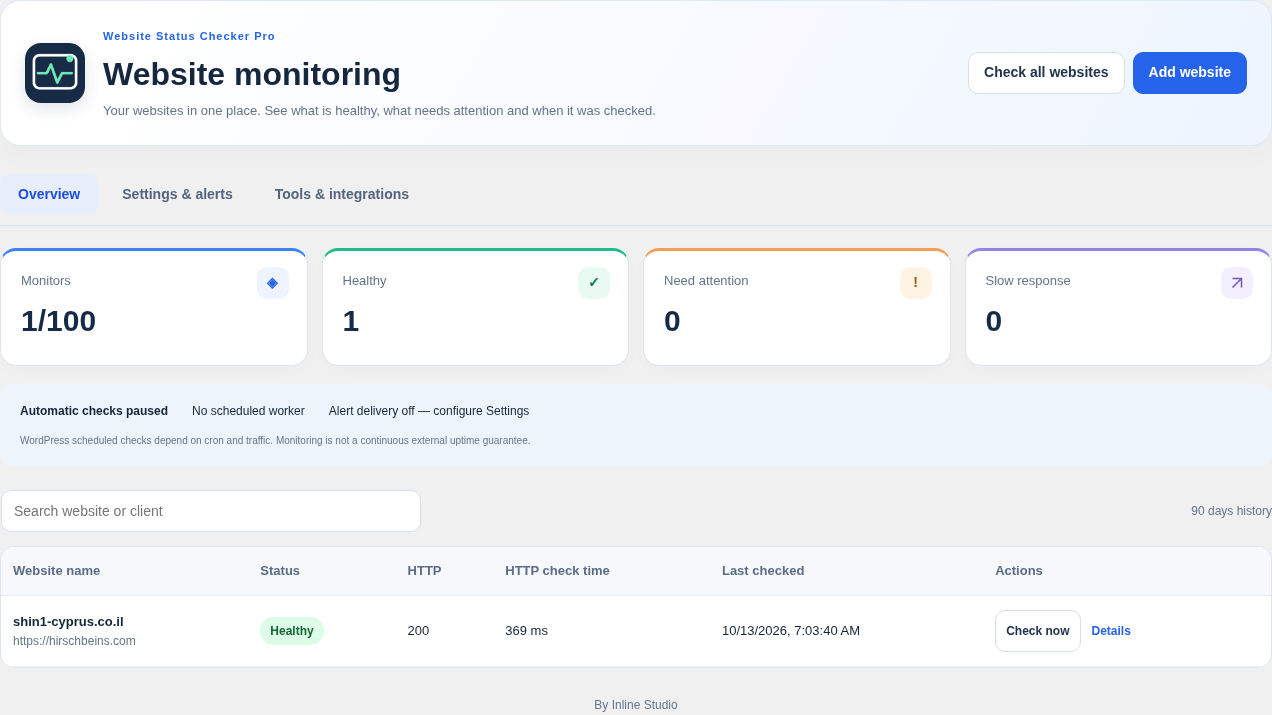
Give each monitor a clear name, search your list and assign client groups. Pause individual websites or use a maintenance window to suspend checks while you work.

Website Status Checker Pro 2.0.4 brings up to 100 websites, custom check intervals, content and SSL checks, incident alerts and a mobile dashboard into one clear workspace.
A redesigned monitoring dashboard built for website owners, maintenance teams and client work. Check your websites together, watch results appear as each check finishes, and see what needs attention.
Give each monitor a clear name, search your list and assign client groups. Pause individual websites or use a maintenance window to suspend checks while you work.
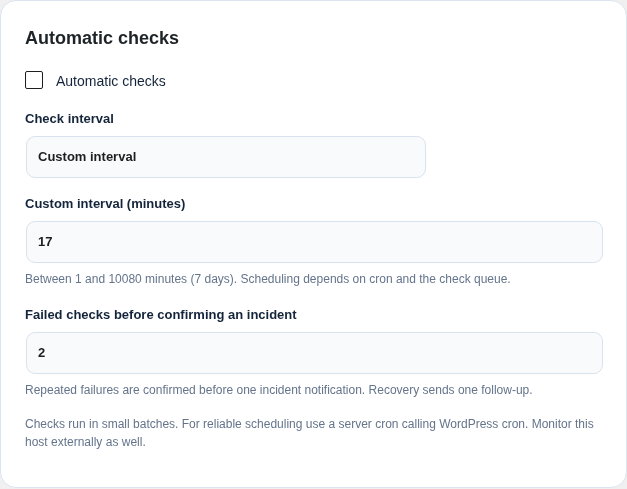
Choose 1, 5, 15, 30 or 60 minutes, daily checks, or enter your own whole-minute interval from 1 minute to 7 days. Changing the interval updates existing monitor deadlines.
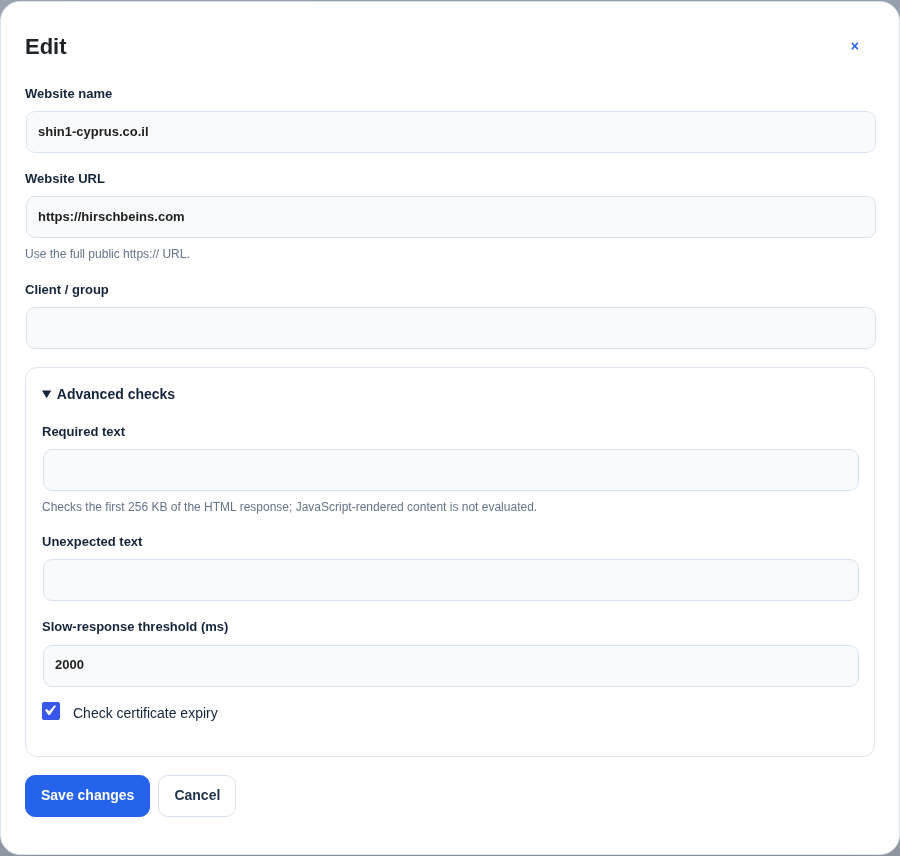
Set required or unexpected text, choose a slow-response threshold for each website and enable SSL expiry checks. Content checks inspect the first 256 KB of server HTML; they do not execute JavaScript.
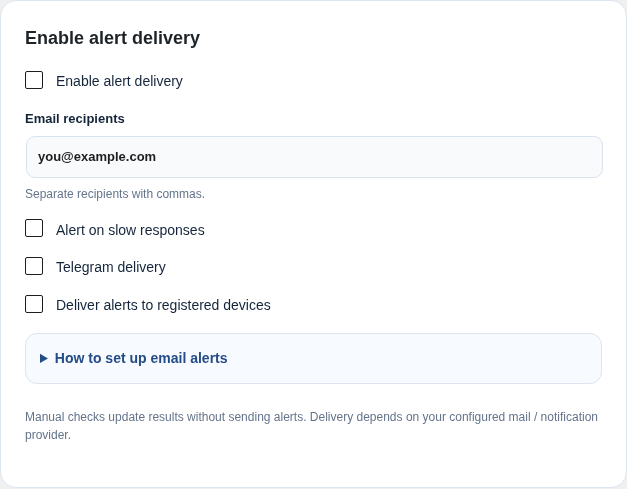
Choose how many failed checks confirm a problem. Deliver alerts by email, Telegram or supported browser Push. Successful incident delivery is not repeated for every failure; recovery receives one follow-up. Slow-response alerts are optional.
Keep 90 days of observed check samples, review response-time graphs and recent incidents, export retained checks to CSV, or print a branded report and save it as PDF.
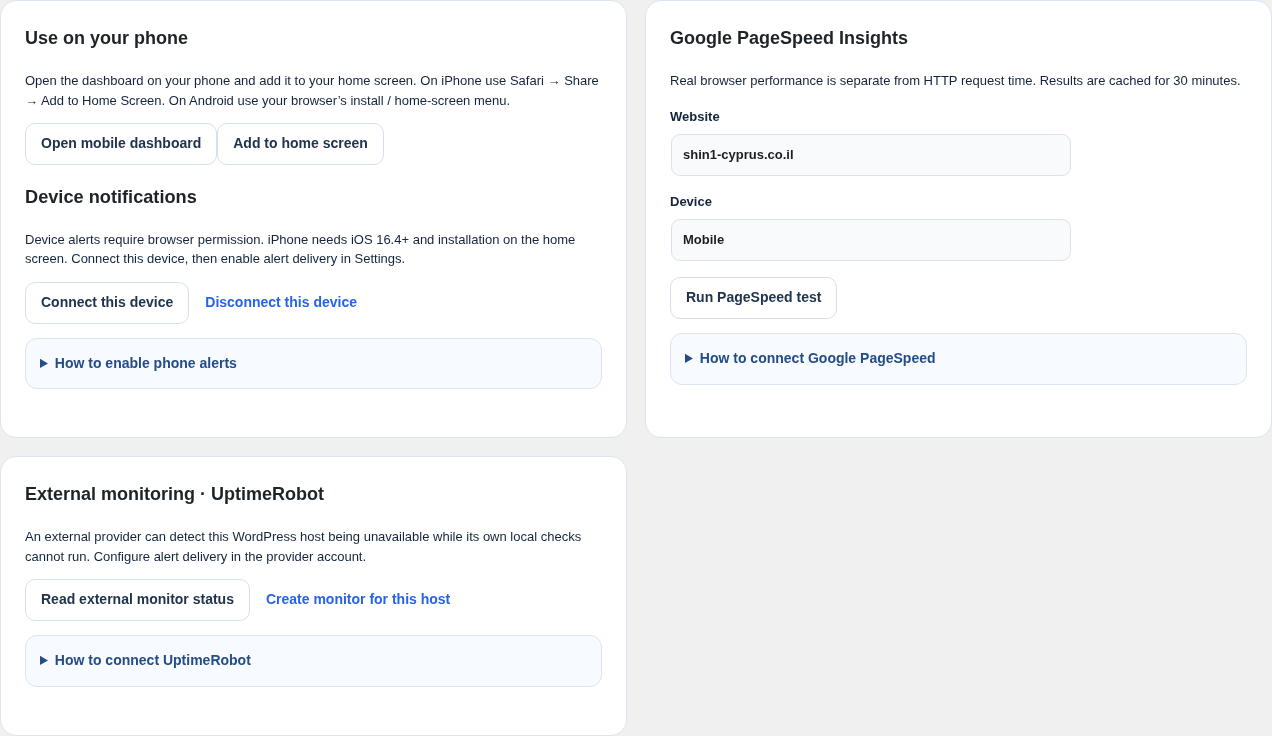
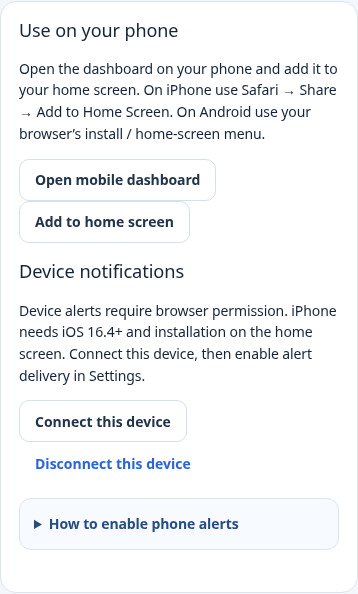
Add the mobile dashboard to your home screen, sign in as an administrator and connect the device for notifications. Tap an alert to open management. Private administration data is not cached offline.
Telegram: bot-token and chat-ID instructions with official links. Google PageSpeed: mobile/desktop performance tests and API setup help. UptimeRobot: read external monitor status or create a monitor for your WordPress host after confirmation. Email: guidance for your existing WordPress mail service or SMTP configuration.
| Feature | Lite | Pro 2.0.4 |
|---|---|---|
| Monitored websites | Up to 2 | Up to 100 |
| Automatic check target | Once a day | Presets plus a custom interval: 1 minute–7 days |
| Manual checks and live batch progress | Included | Included |
| Email incident/recovery alerts | One recipient | Multiple recipients |
| Recorded check history | 7 days | 90 days |
| Home-screen dashboard shortcut | Included | Included |
| Browser/device Push and Telegram | — | Included with setup and permission |
| Required/unexpected HTML text checks | — | Included |
| Custom slow threshold and optional slow alerts | — | Included |
| SSL expiry warnings | — | Included when certificate inspection is available |
| Client groups and maintenance windows | — | Included |
| Response graphs, CSV and branded print/PDF | — | Included |
| Google PageSpeed and UptimeRobot tools | — | Optional API integrations |
Checks use WordPress scheduled tasks and run in bounded batches. Actual timing depends on cron, site traffic, hosting and the check queue. Use a hosting cron trigger for more predictable timing. History represents observed checks, rather than continuous uptime.
Open the mobile dashboard on HTTPS, connect your device and grant browser permission, then enable device delivery and alert delivery in Settings. No external Push account or API key is required. Web Push needs PHP 8.2 or newer with OpenSSL and a supported browser. On iPhone, use iOS 16.4 or newer and install the dashboard through Safari’s Add to Home Screen menu.
A plugin cannot run while its own host is unavailable. Use external monitoring for that host and configure alert contacts in your provider account. The UptimeRobot integration helps you view and create that external monitor; provider alerts are separate from this plugin’s delivery channels.
Your hosting mail service, Telegram configuration, Google API access and external-monitoring account are managed separately. Provider plans, quotas and delivery requirements apply. PageSpeed measures browser performance separately from the plugin’s HTTP request timing.
The editions share monitor data. Pro becomes the active monitoring interface and unlocks its limits and tools. Existing websites are retained, including saved websites above the Lite limit. Review your schedule, recipients and alert-delivery preferences after upgrading.
Basic requirements: WordPress 5.8 or newer, PHP 7.4 or newer, and outbound access to the public HTTP/HTTPS websites you configure. Optional Web Push needs PHP 8.2+, OpenSSL, HTTPS and browser consent. Manual checks do not send alerts.
Choose a preset frequency or enter your own interval from 1 minute to 7 days. Checks depend on WordPress cron and hosting.
Get notified after a problem is confirmed and when the website recovers. Connect supported devices with explicit permission.
Organize websites by client, search your list and watch results appear as each manual check completes.
Check required or unexpected server HTML text, inspect certificate expiry and use maintenance windows while making changes.
Review response graphs and incidents, export CSV or print a branded report and save it as PDF.
Run Google PageSpeed tests and connect UptimeRobot to view external status or create a monitor for this host. Provider accounts apply.
One-time payment of $29 includes one year of updates and priority customer support.
License Renewal After One Year: After one year, you can renew updates and support for another year.
Monitor up to 100 websites and keep client work organized with groups and maintenance windows.
Use a ready-made interval or enter a custom whole-minute frequency from 1 minute to 7 days.
Receive confirmed-incident and recovery alerts through your configured email, Telegram or supported device channels.
Review 90 days of observed checks and share CSV exports or branded print / Save as PDF reports.
The Pro version saved me so much time! I can now automatically monitor multiple websites, and I always get notified immediately if something goes down.
"I’ve been using the Lite version for a while, and the Pro upgrade is totally worth it. The automatic checks and email notifications keep me on top of things without needing to do anything manually."
Simple to use to monitor my sites ,does the job well. the pro version with automatic checks and the nice graphs is definitely worth it
Get Pro 2.0.4 with custom monitoring, advanced checks, client reports and optional notification integrations, plus one year of updates and priority customer support.


For more information or assistance,
feel free to contact our support team at:
[email protected]
© All rights reserved to Inline Studio
באתר זה נעשה שימוש בטכנולוגיות איסוף מידע כגון Cookies, לרבות על ידי צדדים שלישיים, כדי לספק לך חוויית גלישה טובה יותר וכן למטרות סטטיסטיקה, איפיון ושיווק. המשך הגלישה באתר מהווה הסכמתך לכך. למידע נוסף בנושא ואפשרות לנהל את השימוש באמצעים הללו, ראו את מדיניות הפרטיות המעודכנת שלנו.
אינליין סטודיו, אחראי על הקמת והפעלת אתר https://inline-studio.co.il/. אנו רואים חשיבות רבה במתן שירות שוויוני לכלל האזרחים ובשיפור השירות הניתן לאזרחים עם מוגבלות.
אנו משקיעים משאבים רבים בהנגשת האתר והנכסים הדיגיטליים שלנו על מנת להפוך את שירותי החברה לזמינים יותר עבור אנשים עם מוגבלות.
במדינת ישראל כ-20 אחוזים מקרב האוכלוסייה הינם אנשים עם מוגבלות הזקוקים לנגישות דיגיטלית, על מנת לצרוך מידע ושירותים כללים.
הנגשת האתר של אינליין סטודיו, נועדה להפוך אותו לזמין, ידידותי ונוח יותר לשימוש עבור אוכלוסיות עם צרכים מיוחדים, הנובעים בין היתר ממוגבלויות מוטוריות שונות,
לקויות קוגניטיביות, קוצר רואי, עיוורון או עיוורון צבעים, לקויות שמיעה וכן אוכלוסייה הנמנית על בני הגיל השלישי.
הנגשת אתר זה בוצעה על ידי חברת הנגשת האתרים "וי – הנגשת אתרים" (VEE).
רמת הנגישות באתר – AA
חברת "וי", התאימה את נגישות האתר לדפדפנים הנפוצים ולשימוש בטלפון הסלולרי ככל הניתן, והשתמשה בבדיקותיה בקוראי מסך מסוג Jaws ו- NVDA.
מקפידה על עמידה בדרישות תקנות שוויון זכויות לאנשים עם מוגבלות 5688 התשע"ג 2013 ברמת AA. וכן, מיישמת את המלצות מסמך WCAG2.2 מאת ארגון W3C.
בעברית: WCAG 2.0 הנחיות לנגישות תכנים באינטרנט
באנגלית: 0Web Content Accessibility Guidelines (WCAG) 2.
הנגשת האתר בוצעה בהתאם להנחיות רשות התקשוב להנגשת יישומים בדפדפני אינטרנט.
כיצד עוברים למצב נגיש?
באתר מוצב אייקון נגישות (בד"כ בדפנות האתר). לחיצה על האייקון מאפשרת פתיחת של תפריט הנגישות. לאחר בחירת הפונקציה המתאימה בתפריט יש להמתין לטעינת הדף ולשינוי הרצוי בתצוגה (במידת הצורך).
במידה ומעוניינים לבטל את הפעולה, יש ללחוץ על הפונקציה בתפריט פעם שניה. בכל מצב, ניתן לאפס הגדרות נגישות.
התוכנה פועלת בדפדפנים הפופולריים: Chrome, Firefox, Safari, Opera בכפוף (תנאי יצרן) הגלישה במצב נגישות מומלצת בדפדפן כרום.
האתר מספק מבנה סמנטי עבור טכנולוגיות מסייעות ותמיכה בדפוס השימוש המקובל להפעלה עם מקלדת בעזרת מקשי החיצים, Enter ו- Esc ליציאה מתפריטים וחלונות.
לצורך קבלת חווית גלישה מיטבית עם תוכנת הקראת מסך, אנו ממליצים לשימוש בתוכנת NVDA העדכנית ביותר.
תיקונים והתאמות שבוצעו באתר:
התאמה לקורא מסך – התאמת האתר עבור טכנולוגיות מסייעות כגון NVDA , JAWS
אמצעי הניווט באתר פשוטים וברורים.
תכני האתר כתובים באופן ברור, מסודר והיררכי.
האתר מותאם לצפייה בדפדפנים מודרניים.
התאמת האתר לתצוגה תואמת מגוון מסכים ורזולוציות.
כל הדפים באתר בעלי מבנה קבוע (1H/2H/3H וכו').
לכל התמונות באתר יש הסבר טקסטואלי חלופי (alt).
פונקציונליות תוכנת נגישות:
התאמה לקורא מסך – התאמת האתר עבור טכנולוגיות מסייעות כגון NVDA , JAWS
עצירת הבהובים – עצירת אלמנטים נעים וחסימת אנימציות
דילוג ישיר לתוכן – דילוג על התפריט הראשי ישירות אל התוכן.
התאמה לניווט מקלדת
הגדלה / הקטנה של טקסט
ריווח בין אותיות / מילים / שורות
ניגודיות וצבע – גבוהה, הפוכה, שחור לבן
גופן קריא
הדגשת קישורים
מדריך קריאה
שינוי אייקון סמן עכבר
תיאור לתמונות
החרגות
חשוב לציין, כי למרות מאמצינו להנגיש את כלל הדפים והאלמנטים באתר, ייתכן שיתגלו חלקים או יכולות שלא הונגשו כראוי או שטרם הונגשו.
אנו פועלים לשפר את נגישות האתר שלנו כל העת, כחלק ממחויבותנו לאפשר לכלל האוכלוסייה להשתמש בו, כולל אנשים עם מוגבלות.
יצירת קשר בנושא נגישות
במידה ונתקלתם בבעיה בנושא נגישות באתר, נשמח לקבל הערות ובקשות באמצעות פנייה לרכז הנגישות שלנו:
על מנת שנוכל לטפל בבעיה בדרך הטובה ביותר, אנו ממליצים מאוד לצרף פרטים מלאים ככל שניתן:
אינליין סטודיו תעשה ככל יכולה על מנת להנגיש את האתר בצורה המיטבית ולענות לפניות בצורה המקצועית והמהירה ביותר.
רכזת נגישות:
ענבל סורוקה
טלפון: 0547525446
מייל: [email protected]
תאריך עדכון הצהרת נגישות 3.3.25